Batch compression
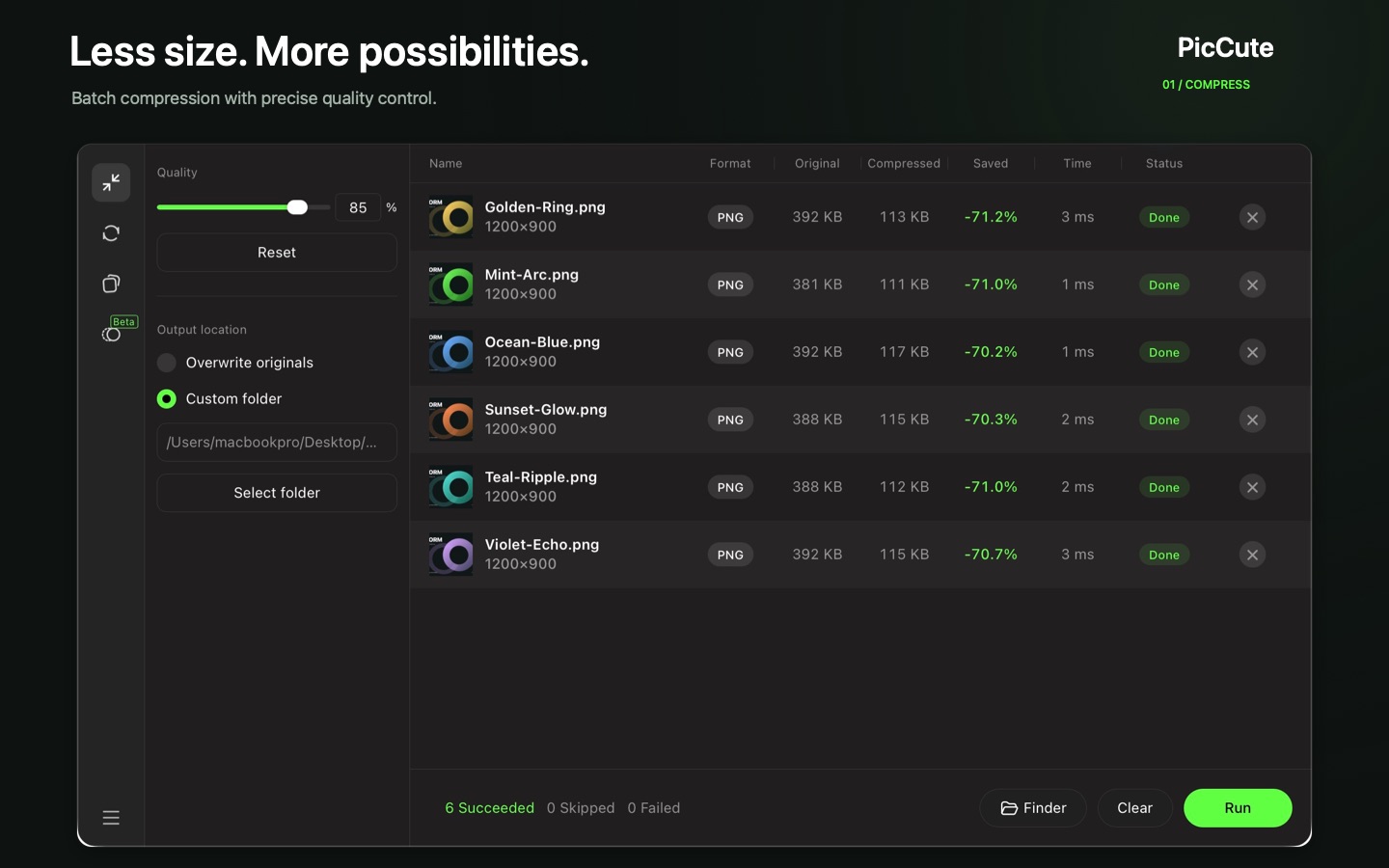
Drag in images or folders and adjust a single quality slider. Files shrink by over 60% in seconds, with visual quality virtually unchanged.

Mac App · Image tool
Less size, more possibilities. Drop in images or whole folders, move one slider and shrink files by over 60% in seconds, or convert them to the format you need. Everything runs locally on your Mac.
Requires macOS. Price and availability vary by region.
Features
Prepare images for sharing, websites and projects without opening them one at a time.
Drag in images or folders and adjust a single quality slider. Files shrink by over 60% in seconds, with visual quality virtually unchanged.
Convert PNG, APNG, JPG, WebP, HEIC, GIF, BMP and TIFF into PNG, JPG, WebP, HEIC or GIF. Animated APNG conversion included.
Open any image in the compare view and drag the slider to inspect details instantly before you share.
A multithreaded engine built on Rust processes large folders concurrently, even with big batches.
Layered glass panels and frosted window materials that adapt smoothly to Light and Dark mode.
Every image is processed locally on your Mac. No files are ever uploaded to any server.
Screenshots
Switch between Compress and Convert from the sidebar. Results, savings and timing appear for every file.
Batch compression with precise quality control.
Your images, the right format: PNG, JPG, HEIC, WebP, GIF and APNG.
Format finder
Pick what you have and what you want. PicCute supports 8 input formats and 5 output formats.
Conversion runs offline. Your original files are kept unless you choose to overwrite them.
Drag the quality slider to preview how a 6-file PNG batch responds.
| Format | Input | Output | Transparency | Animation | Typical Mac Workflow |
|---|---|---|---|---|---|
| PNG | Yes | Yes | Alpha channel | Static | macOS screenshots, UI assets, design exports |
| APNG | Yes | Convert | Alpha channel | Animated | Convert animated APNG sequences into compatible formats |
| JPG / JPEG | Yes | Yes | No | Static | Universal photo sharing, email attachments, CMS uploads |
| WebP | Yes | Yes | Alpha channel | Static | Fast-loading website images and modern web apps |
| HEIC | Yes | Yes | Supported | Static | Convert iPhone photos to JPG/PNG or archive in compact HEIC |
| GIF | Yes | Yes | 1-bit | Supported | Lightweight clips and chat/documentation animations |
| BMP & TIFF | Yes | Input only | TIFF supported | Static | Batch convert uncompressed scans and legacy assets to PNG/JPG/WebP |
Use cases
Shrink a collection of mockups before sending them to a client or teammate, without visible quality loss.
Convert a folder of PNGs to WebP to speed up a website, or export JPGs for an app store listing.
Compress screenshots and iPhone HEIC photos for storage, email or upload forms with size limits.
How to use PicCute
The same flow works for compressing and converting.
Open PicCute and drag in images, folders or subfolders.
Select Compress or Convert, then set the quality slider or pick a target format.
Review quality, output format and where the files will be saved.
Inspect the results and open the output folder in Finder.
The exact reduction depends on the source images and settings. Keep your originals if you may need them later.
Yes. Add multiple images or whole folders, including subfolders, and PicCute processes the batch with your selected settings.
No. Every image is processed locally on your Mac. No files are ever uploaded to a server, and PicCute works offline.
PicCute typically shrinks files by over 60% in seconds while keeping visual quality virtually unchanged. Exact results depend on the original file, its format and the settings you choose. The compare view helps you decide.
Yes. Open Convert, choose JPG as the target format and click Run. PicCute also converts to PNG, WebP, HEIC and GIF.
Yes. Convert mode supports animated APNG conversion.
Yes. Open any image in the compare view and drag the slider to inspect details side by side.
PicCute uses a multithreaded engine built on Rust to process large folders of images in parallel.
Get PicCute on the Mac App Store and process your next batch in seconds.
More from Good tools

A vintage style calculator for iPhone with scientific mode and reusable history.